The sidebar
Every area of your store, and what you find in each one.
The sidebar on the left holds every area of your store. Press a name to open it. An arrow (⌄) next to a name means it has more pages inside: press the arrow to show them.
Here is the sidebar with every area opened:
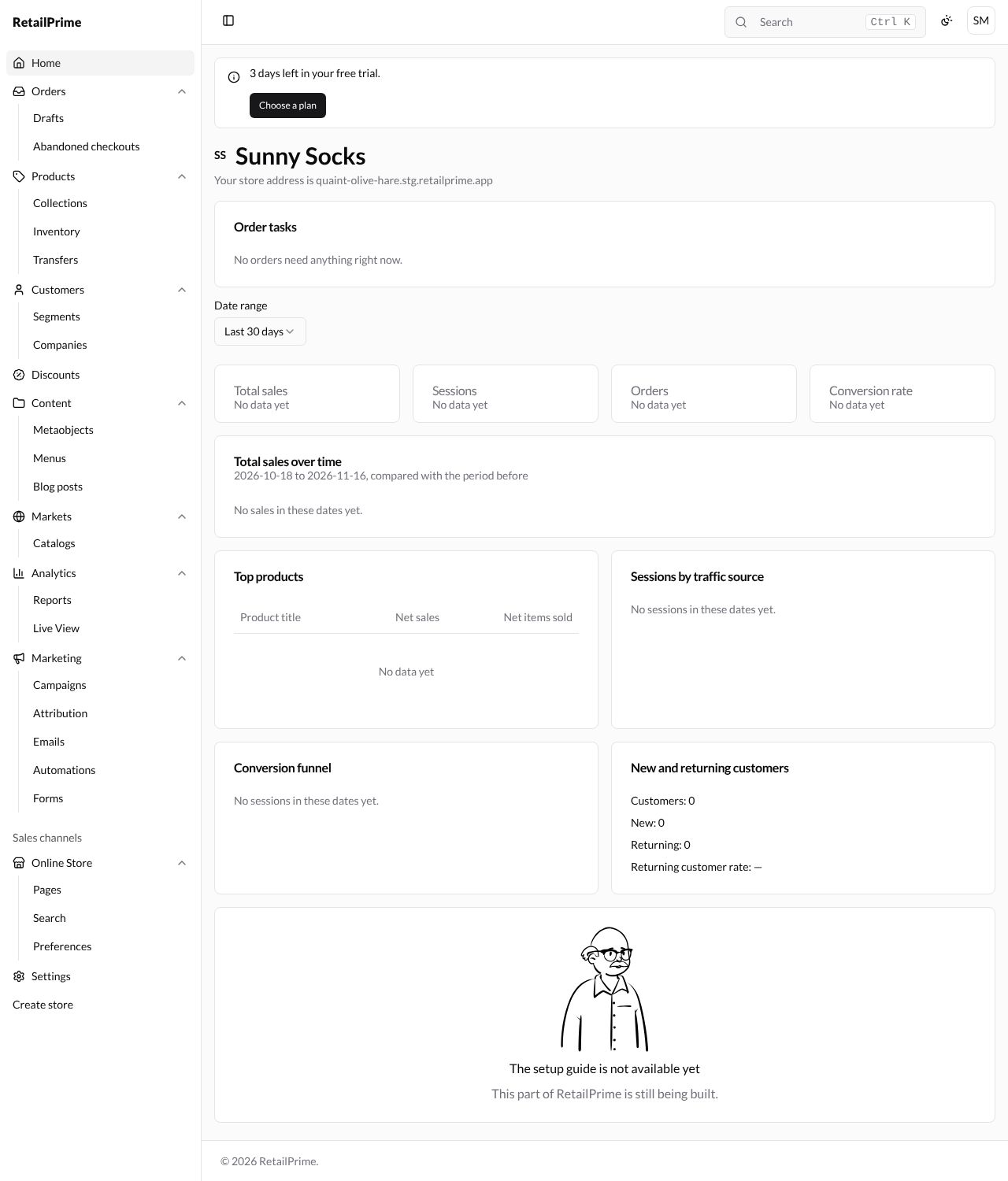
Every area, from top to bottom
| Area | Pages inside | What it’s for |
|---|---|---|
| Home | Your store at a glance. See Your Home page. | |
| Orders | Drafts, Abandoned checkouts | Orders from buyers; orders you make yourself (drafts); checkouts buyers started but didn’t finish. |
| Products | Collections, Inventory, Transfers | What you sell; groups of products; how many you have at each location; moving stock between locations. |
| Customers | Segments, Companies | People who buy from you; groups of customers that match rules you set; businesses that buy from you. |
| Discounts | Codes and automatic discounts. | |
| Content | Metaobjects, Menus, Blog posts | Your files and images; your own kinds of content; the menus on your store; blog posts. |
| Markets | Catalogs | Selling in other countries or to businesses; the products and prices each market sees. |
| Analytics | Reports, Live View | Charts and figures; detailed reports; who is on your store right now. |
| Marketing | Campaigns, Attribution, Emails, Automations, Forms | Bringing in and keeping buyers: campaigns, where sales came from, marketing emails, emails that send themselves, and sign-up forms. |
| Online Store (under Sales channels) | Pages, Search, Preferences | How your store looks (themes); pages such as About us; how search works on your store; your store’s title, password and social image. |
| Settings | Everything about how your store works: details, users, plan, payments, shipping, taxes, locations, apps, domains and more. | |
| Create store | Starts another store under your account, with the same steps as Create your store. |
What’s next
You have finished getting started. Next, learn to sign out and sign in again.